MetaMask is one of the most popular crypto wallets used in the cryptocurrency industry.
It allows users to store cryptocurrency, connect with decentralized applications (dApps), buy NFTs, use DeFi platforms, and interact with the Ethereum blockchain safely.
For beginners entering crypto, MetaMask is often the first wallet they use.
However, many beginners make mistakes during setup that can put their crypto funds at risk.
In this beginner-friendly MetaMask wallet setup guide, you will learn:
- What MetaMask is
- How to install MetaMask
- How to create a new wallet
- How to protect your seed phrase
- Important security tips
- Common mistakes beginners should avoid
This guide is designed specifically for beginners who want to learn crypto safely.
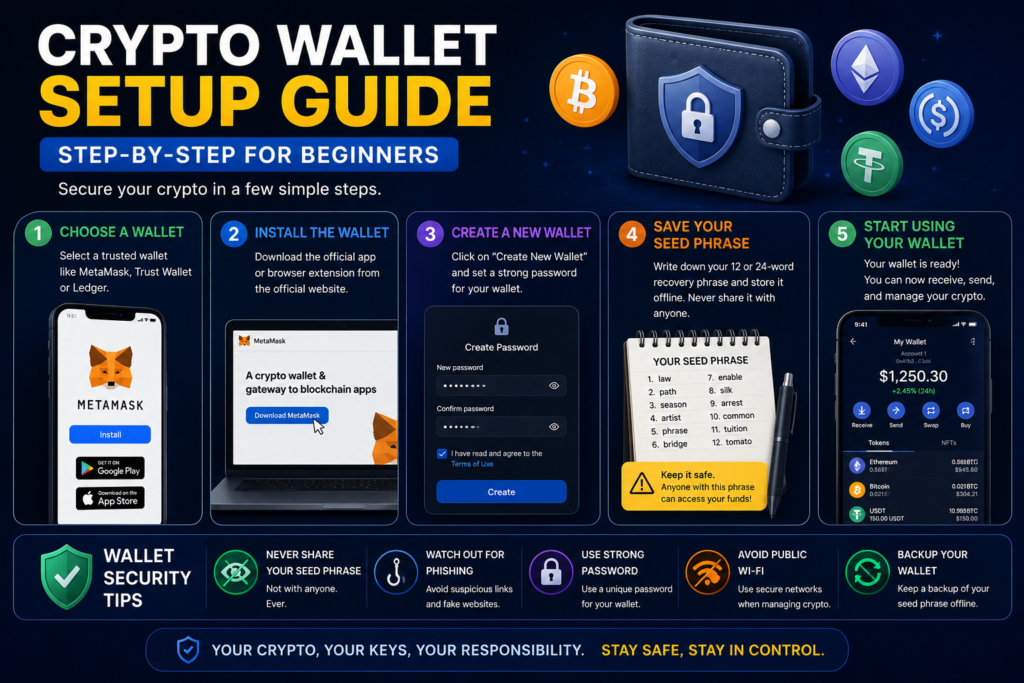
What Is MetaMask?
MetaMask is a crypto wallet mainly designed for Ethereum and Ethereum-based tokens.
It works as:
- Browser extension
- Mobile application
MetaMask allows users to:
- Store crypto
- Send and receive Ethereum
- Connect with Web3 websites
- Access decentralized finance platforms
- Buy and manage NFTs
MetaMask is considered one of the most trusted hot wallets in crypto.
Why Beginners Use MetaMask
MetaMask is popular because it is:
- Easy to install
- Beginner friendly
- Widely supported
- Free to use
- Compatible with many crypto platforms
Many decentralized applications require MetaMask connection for transactions and wallet access.
This makes MetaMask extremely important for Web3 users.
How to Install MetaMask Wallet
Step 1: Visit The Official Website
Always download MetaMask from the official website.
Avoid fake links shared on Telegram, Discord, or social media.
Step 2: Install Browser Extension
MetaMask supports browsers like:
- Google Chrome
- Brave
- Microsoft Edge
- Firefox
Click “Download” and install the extension.
Step 3: Create A New Wallet
After installation:
- Click “Create New Wallet”
- Set a strong password
- Continue setup process
This password protects wallet access on your device.
Understanding Seed Phrase
During setup, MetaMask provides a secret recovery phrase.
This is also called:
- Seed phrase
- Recovery phrase
The seed phrase is the most important part of your wallet security.
Anyone with access to your seed phrase can fully control your crypto.
How To Protect Your Seed Phrase
Important Rules
Never:
- Share your seed phrase
- Save screenshots
- Upload it to cloud storage
- Send it on Telegram or email
Always:
- Write it on paper
- Store it offline safely
- Keep backup copies securely
Most crypto scams target seed phrases.
How To Add Crypto To MetaMask
After creating the wallet, users can:
- Receive Ethereum
- Transfer crypto from exchanges
- Add custom tokens
To receive crypto:
- Copy your wallet address
- Paste it on the exchange withdrawal page
- Verify address carefully
- Complete transfer
Always double-check wallet addresses before sending funds.
How To Connect MetaMask To Websites
MetaMask allows users to connect with:
- DeFi platforms
- NFT marketplaces
- Web3 applications
When connecting:
- Verify website authenticity
- Avoid unknown websites
- Read wallet permissions carefully
Fake websites are one of the biggest crypto security risks.
MetaMask Security Tips
1. Use Official Websites Only
Always access MetaMask through official sources.
Phishing websites often look identical to real platforms.
2. Enable Device Security
Protect your:
- Phone
- Laptop
- Browser
Use:
- Antivirus software
- Device passwords
- Secure internet connection
3. Avoid Public WiFi
Public internet networks may increase hacking risks.
Avoid using crypto wallets on unsafe networks.
4. Lock MetaMask When Not Using It
Always lock your wallet after use, especially on shared devices.
5. Consider Hardware Wallet Integration
Advanced users can connect Ledger hardware wallets with MetaMask for better security.
This combines convenience and offline protection.
Common MetaMask Mistakes Beginners Make
Many new users lose funds because of simple mistakes.
Common Errors Include
- Sharing seed phrases
- Clicking fake airdrop links
- Connecting to scam websites
- Installing fake MetaMask apps
- Approving suspicious transactions
Learning basic wallet security can prevent major losses.
Is MetaMask Safe?
MetaMask is considered safe when used properly.
However, because it is a hot wallet connected to the internet, users must follow strong security practices.
Most wallet losses happen because of:
- User mistakes
- Phishing attacks
- Fake websites
- Seed phrase theft
Security awareness is extremely important in crypto.
MetaMask Pros And Cons
| Pros | Cons |
| Beginner Friendly | Internet Connected |
| Free To Use | Phishing Risks |
| Supports NFTs & DeFi | Requires Security Awareness |
| Easy Browser Access | Hot Wallet Risks |
Who Should Use MetaMask?
MetaMask is ideal for:
- Crypto beginners
- Ethereum users
- NFT collectors
- DeFi investors
- Web3 users
However, users storing large amounts should also consider cold wallets for long-term protection.
Also Read
Before setting up MetaMask Wallet, it’s important to understand the basics of blockchain technology. Read our Blockchain: The 5000-Year Story of Trust, Records, and Digital Revolution to understand how decentralized wallets interact with blockchain networks.
MetaMask is one of the world’s most popular self-custody crypto wallets. Before creating your wallet, read our What Is a Crypto Wallet? Complete Beginner Guide to understand how crypto wallets, private keys, and self-custody work.
Your MetaMask Wallet is only as secure as your Seed Phrase. Before using MetaMask, read our How To Protect Your Crypto Seed Phrase Safely (2026 Guide). Complete Ultimate Guide to learn the best practices for protecting your recovery phrase.
MetaMask is widely used to access DeFi platforms, NFTs, and decentralized applications. To understand how decentralized finance works, read our What Is DeFi? Powerful Beginner Guide to Decentralized Finance in 2026.
After setting up your MetaMask Wallet, continue with our Common Crypto Scams Beginners Must Avoid: Complete Ultimate Safety Guide 2026 to learn how to avoid phishing websites, fake wallet extensions, malicious smart contracts, and other common crypto security threats.
Also Read
Learn more about Ethereum on the official Ethereum website
Visit the official MetaMask wallet website to download the wallet safely.
Explore hardware wallet protection on the official Ledger website
Final Thoughts
MetaMask is one of the best crypto wallets for beginners entering the Web3 ecosystem.
It provides easy access to:
- Ethereum
- NFTs
- DeFi
- Decentralized applications
However, proper security is essential.
Before using MetaMask:
- Learn wallet basics
- Protect your seed phrase
- Avoid suspicious links
- Use official websites only
Crypto security should always be the top priority.
Learning safe wallet management can help beginners avoid scams and protect investments long term.
FAQ
join our Telegram for instant crypto updates.
Subscribe to our youtube Channel
For detailed crypto market analysis, price predictions, and investment strategies,
subscribe to our YouTube channel Coin Alert

Dr. Khushwant Rana is the founder of Coin Alert and has 15+ years of business experience. He creates beginner-friendly crypto educational content focused on Bitcoin, blockchain, Web3, crypto security, and real-world crypto awareness in India.